Technical Guide

Stripe conversion tracking: how to see which marketing channels drive payments

Vincent Ruan
Vincent RuanFounder, Attrifast ·

Stripe knows who paid. Your analytics knows where they came from. But neither tool connects the two — leaving you unable to answer the most important marketing question: which channel actually generates revenue? This guide compares four approaches to Stripe conversion tracking, from manual UTM tagging to automated cookieless attribution.

Updated March 2026 · 11 min read
TL;DR
  • Stripe has no marketing attribution — it processes payments server-side with zero browser awareness.
  • Cookie-based tracking misses 30-50% of Stripe payments due to ITP, ad blockers, and domain redirects.
  • Four approaches exist: UTM links (low accuracy), GA4 webhooks (medium), CDPs ($200+/mo), and privacy-first attribution (high accuracy, $0-29/mo).
  • Cookieless, server-side matching provides 90-100% accuracy with 2-minute setup and no consent banners.

The Stripe attribution problem

Stripe is a server-side payment processor. It has no awareness of browser sessions, cookies, UTM parameters, or marketing touchpoints. When a payment_intent.succeeded webhook fires, it contains the amount, currency, customer ID, and payment method — but nothing about how that customer discovered your product.

Your analytics tool has the opposite problem. It knows a visitor arrived from Google Organic or a Facebook Ad — but it has no idea whether that visitor eventually paid. These two systems operate in isolation, and bridging them is the core challenge of Stripe conversion tracking.

The time gap

A visitor clicks a LinkedIn Ad on Monday, browses your pricing page, and leaves. On Wednesday, they return directly and start a free trial. Two weeks later, they upgrade to a paid plan. By then, the LinkedIn cookie is long expired and the marketing source is lost.

The domain gap

Stripe Checkout and Stripe Payment Links redirect customers to stripe.com for payment processing. Since this is a different domain, any cookie-based tracking breaks at the moment of purchase — the exact event you need to attribute.

The server-side gap

Subscription renewals, failed charge retries, plan upgrades, and seat expansions all happen via Stripe webhooks — server-to-server communication with no browser session. Browser-based analytics tools never see these events.

The cost of untracked revenue

Without Stripe conversion tracking, the default behavior is that all revenue shows up as "(direct) / (none)" in analytics — meaning you cannot distinguish between a customer who came from a $5,000/month Google Ads campaign and one who came from a free tweet. Most Stripe-powered SaaS products report 40-60% of their revenue as unattributed. That means half your marketing budget decisions are based on incomplete data.

4 approaches to Stripe conversion tracking

Each approach makes different trade-offs between setup effort, accuracy, cost, and maintenance burden. Here's how they compare on the metrics that matter.

UTM on Payment Links
Setup

30 min

Accuracy

Low (20-40%)

Monthly cost

$0

Maintenance

High

GA4 + Stripe Webhooks
Setup

4-8 hours

Accuracy

Medium (50-70%)

Monthly cost

$0-50/mo

Maintenance

High

CDP / Data Platform
Setup

1-3 days

Accuracy

High (80-90%)

Monthly cost

$200-1,000/mo

Maintenance

Medium

Privacy-First AttributionRecommended
Setup

2 minutes

Accuracy

High (90-100%)

Monthly cost

$0-29/mo

Maintenance

None

Approach 1

UTM parameters on Stripe Payment Links

The simplest starting point: add UTM parameters to your Stripe Payment Links or Checkout URLs and store them in Stripe metadata. When a payment succeeds, the metadata tells you which campaign the customer came from.

// Example: Stripe Payment Link with UTM metadata
https://buy.stripe.com/your_link
  ?client_reference_id=utm_source=twitter&utm_medium=social&utm_campaign=launch

// In your Stripe webhook handler:
app.post('/webhooks/stripe', (req, res) => {
  const event = req.body;
  if (event.type === 'checkout.session.completed') {
    const session = event.data.object;
    const utmData = session.client_reference_id; // "utm_source=twitter..."
    // Store in your database alongside payment data
  }
});
Pros
  • Zero cost — uses Stripe's built-in fields
  • No cookies involved
  • Simple to implement for direct links
Cons
  • Only works for direct-link flows (Payment Links, specific URLs)
  • No cross-session tracking — visitor must pay in the same session they clicked
  • Breaks when visitors navigate your site before checkout
  • No subscription renewal attribution
  • Requires unique links per channel/campaign
Verdict

Works for simple, single-page payment flows (e.g., a direct Buy button in a tweet). Falls apart for any flow where the customer browses your site before paying, starts a trial, or returns on a different day. Captures 20-40% of attribution data at best.

Approach 2

GA4 + Stripe webhook integration

The most common approach: use GA4 for traffic source tracking and pipe Stripe payment events into GA4 via the Measurement Protocol API. In theory, this gives you revenue data inside your existing analytics. In practice, it requires significant engineering effort and still has structural gaps.

// 1. Capture GA4 client_id at checkout time
const gaClientId = document.cookie
  .split('; ')
  .find(c => c.startsWith('_ga='))
  ?.split('.').slice(2).join('.');
// Store gaClientId in your DB alongside the Stripe customer

// 2. In your Stripe webhook handler, send to GA4 Measurement Protocol
await fetch(
  'https://www.google-analytics.com/mp/collect' +
  '?measurement_id=G-XXXXXXXXXX' +
  '&api_secret=YOUR_SECRET',
  {
    method: 'POST',
    body: JSON.stringify({
      client_id: storedGaClientId,   // Retrieved from your DB
      events: [{
        name: 'purchase',
        params: {
          transaction_id: charge.id,
          value: charge.amount / 100,
          currency: 'USD'
        }
      }]
    })
  }
);
Limitation: Requires client_id capture and storage

You must extract the GA4 _ga cookie value at checkout time and store it in your database alongside the Stripe customer. If the user rejects cookies (GDPR consent), there is no client_id to capture.

Limitation: Silent failures on malformed payloads

The Measurement Protocol returns 204 No Content on both success and failure. Malformed events, wrong client_ids, and invalid parameters all fail silently — you need your own validation layer.

Limitation: Cookie consent creates data gaps

Under GDPR, GA4 requires consent before setting cookies. When visitors decline (30-40% in Europe — source: cookiebot.com), there is no client_id. Revenue from these visitors cannot be attributed.

Verdict

The go-to approach for technical teams already invested in GA4. Achieves 50-70% attribution accuracy depending on cookie consent rates and implementation quality. Requires 4-8 hours of engineering time to set up and ongoing maintenance when GA4 schema changes. For a detailed walkthrough of where this breaks, see GA4 Revenue Attribution Limitations.

Approach 3

Customer Data Platform (CDP) integration

CDPs like Segment, RudderStack, and mParticle act as a central data hub — collecting events from your website, app, and backend, including Stripe webhooks. They unify user identity across touchpoints and pipe the joined data to analytics and marketing tools.

This is the enterprise-grade approach, and it works well at scale. The trade-off is complexity and cost: CDPs require careful event taxonomy design, identity resolution configuration, and destination setup. Pricing starts at $120/month for basic plans and scales to $1,000+ for production usage.

When CDPs make sense
  • You already use a CDP for product analytics
  • You have a data engineering team
  • You need to route events to 5+ downstream tools
  • Your monthly tracked-user count justifies the price
When CDPs are overkill
  • You primarily need marketing attribution
  • You are a solo founder or small team
  • Your MRR is under $10,000
  • You want results in hours, not weeks
Verdict

The right choice for companies with dedicated data teams and complex multi-tool stacks. For bootstrapped founders whose primary question is "which channel drives Stripe revenue," a CDP is solving a much bigger problem than needed — at a much higher price point. See our pricing comparison of attribution tools for cost details.

Approach 4 — Recommended

Privacy-first revenue attribution

Privacy-first attribution tools are purpose-built for the problem this article describes: connecting payment processor revenue to marketing traffic sources without relying on cookies or complex data pipelines.

The approach is fundamentally different from GA4 or CDPs. Instead of client-side cookie tracking, these tools use cookieless session identification that persists across visits without storing personal data. When a Stripe payment or Shopify order occurs, the tool matches it to the visitor's session history server-side — no client_id capture, no Measurement Protocol, no BigQuery.

How Attrifast handles Stripe conversion tracking

1

Add a 4kb script tag to your site

The script captures traffic source data — channel, referrer, UTM parameters, landing page — for every visitor session. No cookies are set. No consent banner needed.

2

Connect your Stripe account in one click

OAuth-based connection reads your Stripe payment data securely. All payment types — one-time charges, subscriptions, renewals, refunds — are imported automatically.

3

Payments are matched to sessions server-side

When a payment arrives via Stripe webhook, Attrifast matches the Stripe customer to the original visitor session. The revenue is attributed to the marketing channel that brought the visitor.

What you see
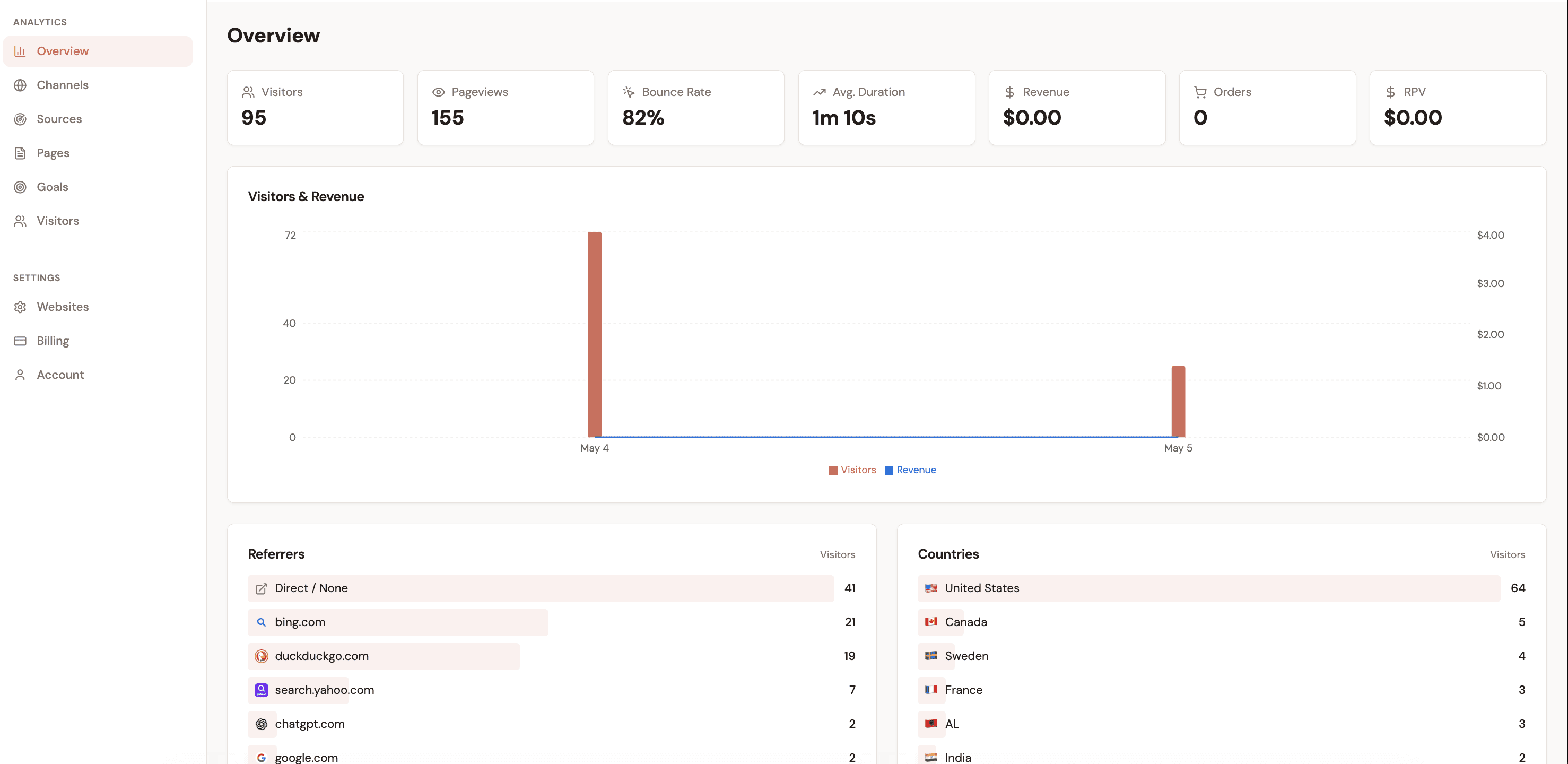
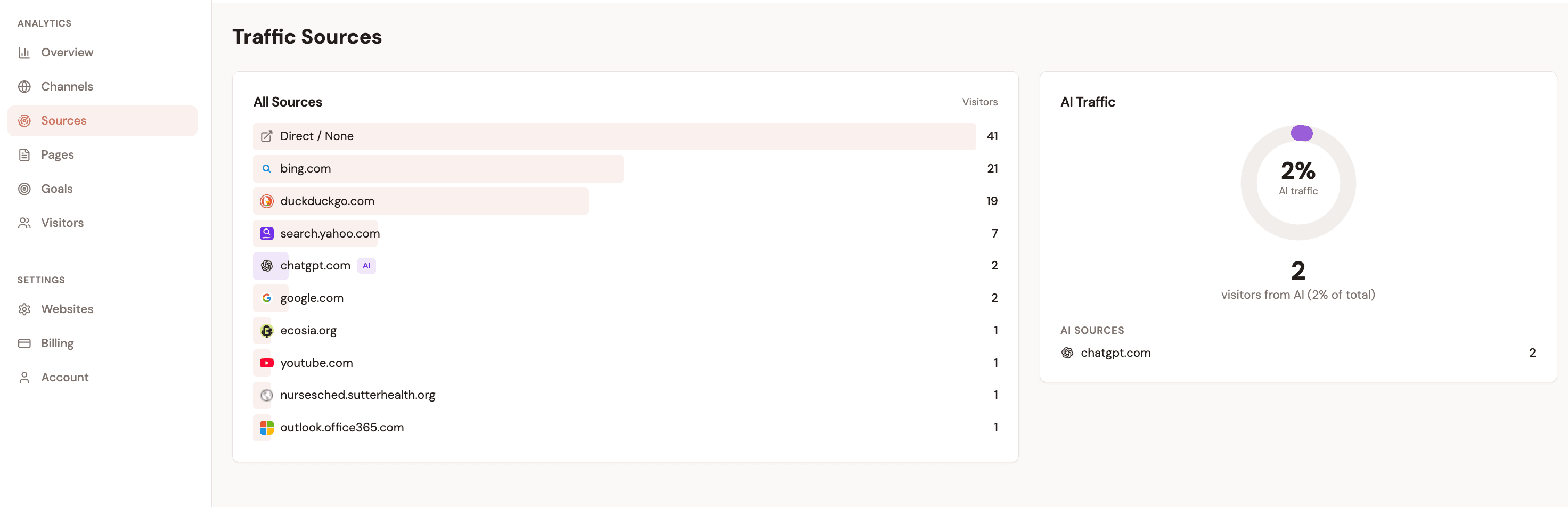
  • Revenue by traffic source (Google, Twitter, direct...)
  • Revenue per Visitor by channel (RPV)
  • Revenue by UTM campaign and landing page
  • Individual visitor journeys from click to payment
What you don't need
  • No consent banner (cookie-free by architecture)
  • No webhook code to write
  • No GA4 Measurement Protocol setup
  • No BigQuery or SQL

Stripe events that matter for attribution

Not every Stripe event is relevant for marketing attribution. Whether you are building a custom solution or evaluating tools, these are the events that connect revenue to marketing channels — and the use cases each event covers.

checkout.session.completed

Customer completes a Stripe Checkout session

Use case

One-time purchases, initial subscription signups, course/product sales

Revenue type

First payment

payment_intent.succeeded

A payment is successfully processed

Use case

Custom payment flows, API-driven charges, in-app upgrades

Revenue type

Any payment

invoice.payment_succeeded

An invoice (often for subscriptions) is paid

Use case

Subscription renewals, seat expansions, usage-based billing

Revenue type

Recurring revenue

customer.subscription.created

A new subscription is created

Use case

Tracking new subscribers separately from one-time buyers

Revenue type

New MRR

Key distinction: initial revenue vs. recurring revenue

For SaaS businesses, the first payment and subsequent renewals should be tracked separately. A customer acquired through a Google Ad in January who renews for 12 months should attribute the initial $49 to Google Ads and the $539 in renewals to the same channel for LTV calculations — but should not inflate this month's "new customer" CAC numbers. Attribution tools that handle Stripe subscriptions correctly make this distinction automatically.

Why cookie-based tracking fails for Stripe payments

Cookie-based tracking was designed for ecommerce stores where the visitor browses and pays on the same website in the same session. Stripe-powered SaaS products break every one of those assumptions.

Safari ITP deletes cookies after 7 days

30% of web traffic uses Safari [source]

Safari's Intelligent Tracking Prevention removes first-party cookies after 7 days of inactivity. For SaaS products with a trial period longer than 7 days, every Safari user who converts from a trial loses their marketing attribution.

Ad blockers block analytics scripts entirely

32% of US internet users use ad blockers [source]

Extensions like uBlock Origin, Privacy Badger, and Brave's built-in blocker prevent GA4 and similar scripts from loading. These visitors are completely invisible to cookie-based analytics — even if they later become paying customers.

Stripe Checkout uses a different domain

Affects all Stripe Checkout users

Stripe Checkout sessions redirect to checkout.stripe.com. Since this is a third-party domain, no cookies from your site are available during the payment. Any tracking that depends on reading cookies at payment time will fail.

GDPR consent banners create opt-out data gaps

30-40% opt-out rate in Europe [source]

GA4 Consent Mode v2 requires explicit consent before setting cookies. When visitors decline, GA4 uses "modeled" (estimated) data. For revenue attribution, estimated data means estimated CAC — which is not accurate enough for budget decisions.

The combined effect: cookie-based Stripe conversion tracking misses 30-50% of payment attributions. Server-side, cookieless approaches avoid all four of these failure modes because they don't depend on browser cookies to identify visitors. For a deeper dive, see Conversion Tracking Without Cookies.

Stripe conversion tracking by use case

SaaS with free trials

The biggest attribution challenge for SaaS: the visitor who signs up for a trial was acquired by marketing, but the payment happens 7-14 days later — often from a different device or session. Cookie-based tracking loses the connection. Server-side attribution connects the trial signup session to the payment event regardless of time gap.

Attribution for bootstrapped SaaS

Ecommerce (Shopify + Stripe)

Shopify stores using Stripe as a payment gateway face the domain-gap problem. Attribution tools that integrate with both Shopify orders and Stripe payments can match marketing touchpoints to revenue from either source, giving a unified view of channel performance.

Shopify revenue attribution

Course creators and digital products

Info products sold through Stripe Payment Links or Gumroad-style checkout have a simple funnel: ad click → landing page → buy. UTM-based tracking on Payment Links (Approach 1) can work here, but breaks when the creator also drives traffic through non-linked channels like podcast mentions or newsletter recommendations.

Stripe marketing attribution

Subscription boxes and physical products

Physical product businesses using Stripe have recurring billing events (subscription renewals) that need attribution to the original acquisition channel. The initial order attribution is straightforward; tracking lifetime revenue per channel across 6-12 months of renewals requires persistent attribution data.

Revenue attribution features

Key takeaways

1Stripe has no native marketing attribution. Payment events contain revenue data but zero information about which marketing channel drove the customer.
2Cookie-based approaches (GA4, traditional analytics) miss 30-50% of Stripe payment attributions due to ITP, ad blockers, cross-domain checkout, and GDPR consent.
3UTM parameters on Payment Links work for simple direct flows but break for any multi-step or multi-session purchase journey.
4GA4 + Measurement Protocol can achieve 50-70% accuracy but requires significant engineering effort and ongoing maintenance.
5CDPs provide enterprise-grade tracking at enterprise-grade prices — typically $200-1,000/month, which exceeds the entire marketing budget of many bootstrapped products.
6Cookieless, server-side attribution tools solve the Stripe tracking problem at the right complexity and price point for founders and small teams.

Stripe conversion-tracking method — setup time (minutes)

Source: Stripe webhooks reference + Stripe Checkout client_reference_id docs

Track Stripe revenue by marketing channel

Connect Stripe in one click and see which channels drive payments. Cookie-free, no code, 2-minute setup.

Start tracking Stripe revenue →

Loved by 500+ users